Scan areas
In addition to filtering by barcode type, content and orientation, you can include specific areas of the documents in recognition or exclude them from it.
BarcodeOCR always checks the whole page for barcodes. Filtering by areas is a very time-consuming and resource-intensive filter option. Only use it if the barcodes cannot be filtered with the other options.
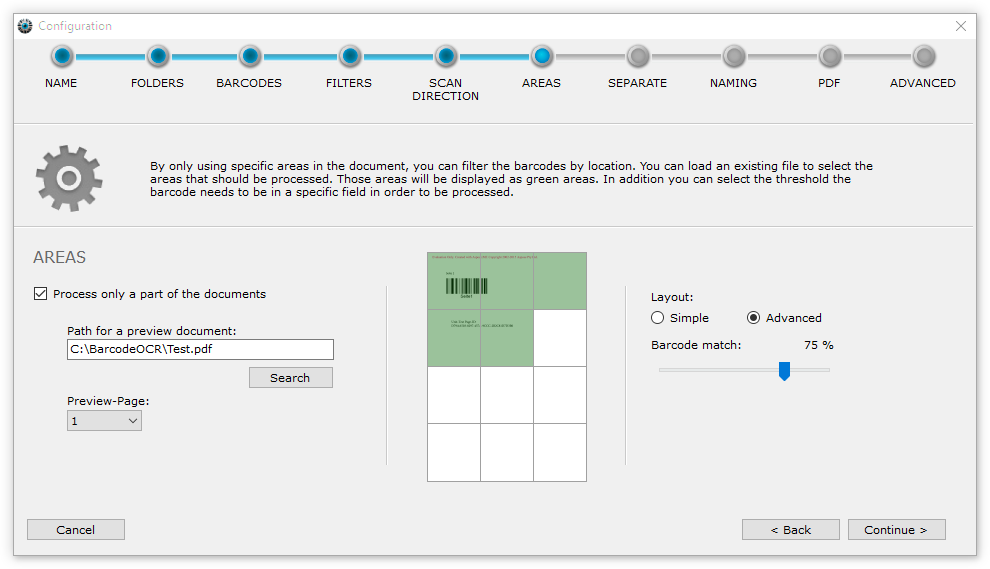
Define the areas
You enable this function with the Process only a part of the documents option. To make it easier to define the areas, BarcodeOCR shows a representative document in the preview.
- Click Search.
- In the dialog, select a scanned file from your scanner that BarcodeOCR will process automatically later on.
- If needed, select a specific page of the file under Preview-Page.
- In the grid, mark the areas in which barcodes should be recognized.
BarcodeOCR only processes barcodes within the green areas. Barcodes in the white areas are ignored.
Barcode match
If a barcode lies partly in a green and partly in a white area, use the Barcode match slider to set what percentage of the barcode must lie within the green area.
- At 50%, at least half of the barcode must be within the green area.
- At 100%, the whole barcode must be within the green area for BarcodeOCR to use it for splitting.
Layout
Under Layout you choose between a simple grid (Simple, 2×2 blocks) and an advanced grid (Advanced, 3×4 or 3×3 blocks) to define the areas more precisely.