Activate your license
When you purchase BarcodeOCR, you receive a serial number. You activate it in the software on your PC. The fastest way is with an internet connection. If the PC has no internet access, you activate the license offline with a license file.
The License menu also lets you deactivate the license again, so you can use BarcodeOCR on a different PC. See Move to another computer.
Activate with an internet connection
Activation with an internet connection is the quickest and easiest way.
-
Start BarcodeOCR and click License → Activate license on this PC in the menu bar.
-
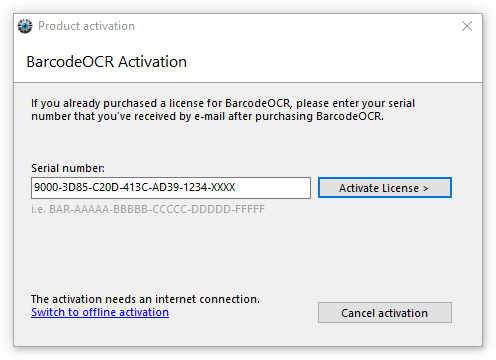
Enter your serial number.
-
Click Activate License.
-
You see an overview of your activated license and edition. If there were problems during activation, an error message appears instead.
After successful activation, you can use the software with the range of functions you have purchased.
During activation, BarcodeOCR connects to the license server to validate the serial number. The data entered in the registration wizard and a unique key derived from your hardware are transmitted. Apart from this, no data or other information is collected or transmitted from your PC.
Make sure that the PC is connected to the internet and that no firewall or proxy server blocks the connection of BarcodeOCR.
Activate without an internet connection
If the PC has no internet connection, you activate the software manually. This takes longer than a few seconds, because support creates the license by hand. In individual cases, this can take up to 48 hours.
-
Start BarcodeOCR and click License → Activate license on this PC in the menu bar.
-
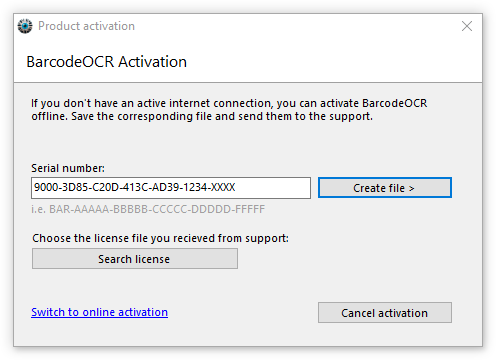
Click Switch to offline activation in the bottom left.
-
Enter your serial number.
-
Click Create file and save the file.
-
Email the saved file to support (contact details).
-
After processing, you receive your license file by email.
-
Open the dialog again and switch to offline activation. Click Search license and select the license file from the email.
After successful activation, you can use the software with the range of functions you have purchased.