Barcodes
BarcodeOCR recognizes many different barcode types. In this step, you select the barcode types BarcodeOCR searches for in this configuration. Barcodes whose type you do not select here are ignored. For the available types, see Supported barcodes.
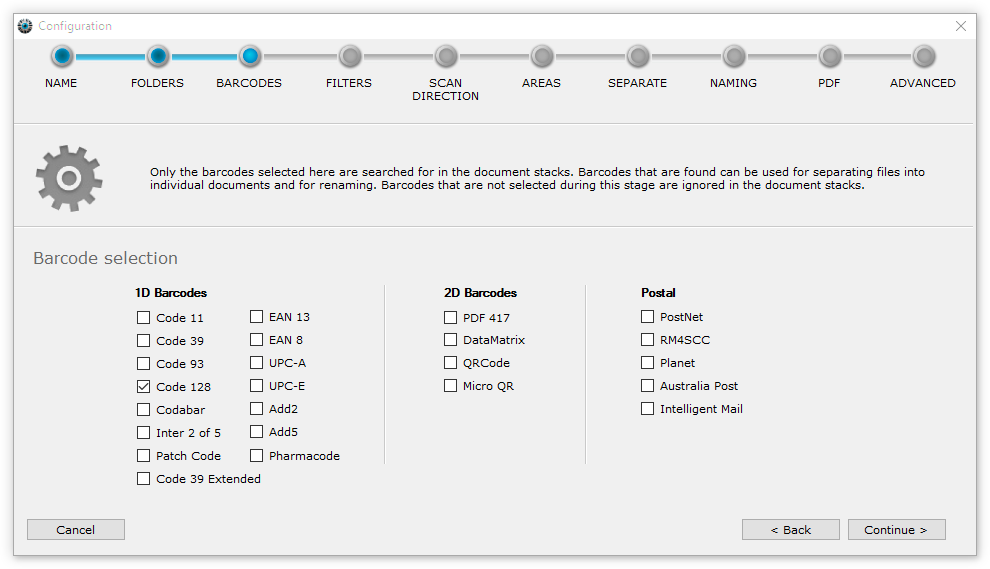
Each selected barcode type adds processing time. So only select the barcode types you actually expect in your documents.
Intelligent Multi-Analysis
Standard edition and higherTo recognize barcodes and QR codes on documents more reliably, BarcodeOCR does not only analyze each page with your settings. It also tests three additional optimized presets. This significantly increases the recognition rate without slowing down processing.
On the contrary: thanks to intelligent multi-processing, BarcodeOCR makes optimal use of the power of modern processors and is even faster than conventional methods.