Troubleshooting
This page lists known problems and how to solve them. If none of the solutions helps, open a support case.
Umlauts and special characters appear incorrectly in the file name
Symptom
When the file is saved, a question mark or another symbol appears in the file name instead of umlauts and special characters (for example ß, ä, ö, ü).
Solution
The barcode was probably created with a character set other than UTF-8 (the default). In German-speaking countries, this may be the "ISO 8859-1" character set.
- Open the configuration and go to the Advanced step.
- Under Character set, select ISO 8859-1.
- Process the file again.
If this does not solve the problem, please open a support case.
An error appears when BarcodeOCR calls a PowerShell script
Symptom
When BarcodeOCR calls a PowerShell script, this error message appears (shown here as output by a German Windows system):
Add-Type : Die Datei oder Assembly "file:///C:\Program Files (x86)\BarcodeOCR\BarcodeOCR.PowerShellModels.dll"
oder eine Abhängigkeit davon wurde nicht gefunden. Die Assembly wird von einer Laufzeit erstellt,
die aktueller als die derzeit geladene Laufzeit ist, und kann nicht geladen werden.
In English, the message says that the file or assembly BarcodeOCR.PowerShellModels.dll or one of its dependencies could not be found, because the assembly was built by a runtime newer than the currently loaded runtime.
Solution
Make sure that .NET Framework v4.0.30319 is loaded in PowerShell. BarcodeOCR requires this version. To check, run $PSVersionTable: the CLRVersion value must start with 4.0.30319.
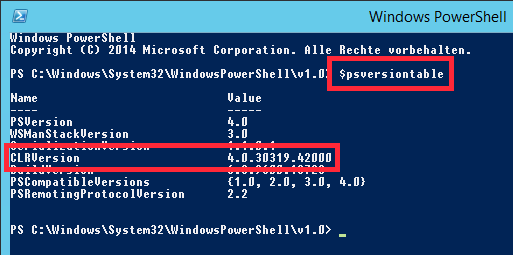
How to prepare PowerShell for BarcodeOCR is described in Prepare PowerShell.
The file name starts with "FNC1"
Symptom
The recognized file name is, for example, FNC1 4100002561.pdf.
Solution
Your software generates a different barcode type than expected: you have probably selected recognition of Code 128 in the configuration, but your software generates EAN 128. Check the selection in the Barcodes step.
Code 39 barcodes are recognized incorrectly
Symptom
A document with a 1D barcode of type Code 39 Extended (Full ASCII) is read with these settings:
- Barcode type: Code 39
- Scan direction: any
Instead of lowercase letters, uppercase letters preceded by + appear. Special characters are incorrectly shown as % characters.
Solution
In the Barcodes step, select Code 39 Extended.
Pharmacode barcodes are recognized incorrectly
Symptom
A document with a 1D barcode of type Pharmacode is read with these settings:
- Barcode type: Pharmacode
- Scan direction: all or Right to left
Digits other than the encoded ones are recognized.
Solution
In the Scan direction step, select Left to right and clear all other options.
Pharmacodes can be read from left to right and from right to left, with different results. As a rule, please use the Right to left option. Under special circumstances, Left to right may be required, for example if your scanner scanned the document rotated by 180° and the image in the PDF file was rotated.
Barcodes in exported PDF files are not recognized
The default settings of BarcodeOCR are optimized for image PDF files from a scanner. If the barcode is in a vectorized PDF file, it is therefore usually not recognized. How to find out and solve this is described in Recognize barcodes in exported PDFs.