Barcode design and scan quality
Experience shows that a recognition rate of 100% is easily possible if you pay attention to a few points. What matters most is the quality of the scan and the design and placement of the barcodes on the document.
Scan quality
The highest possible scan quality is a good basis for reliable recognition. The barcode should be complete and must not be cut off, creased or damaged.
The higher the scan resolution, the better barcodes are recognized. If the high resolution is only needed for recognition, you can reduce it again for archiving, see Text recognition and optimization.
Each of the following examples shows a detail at 100% of the document size.
Example 1: compressed barcode with soft edges
| Scan | Original barcode |
|---|---|
 |  |
The barcode is compressed ("squeezed"), and the scan or compression settings of the scanner have removed the hard transitions from white to black. This makes it harder to tell bars and spaces apart.
Solution:
- Adjust the scan profile on the scanner.
- In BarcodeOCR, turn on the Despeckle option in the Advanced step.
Example 2: deformed barcode
| Scan | Original barcode |
|---|---|
 |  |
The barcode is deformed and was applied incorrectly.
Solution: With 1D barcodes, recognition is usually not possible in this case.
Example 3: damaged barcode
| Scan | Original barcode |
|---|---|
 |  |
The barcode is damaged: some lines are not printed completely. Depending on the degree of damage, the barcode may still be recognized, but possibly incorrectly.
Solution:
- In BarcodeOCR, turn on the Despeckle option in the Advanced step.
- If labels are applied: check the printer.
- Improve the quality of the barcodes.
What should you consider when designing barcodes?
Use Data Matrix barcodes whenever possible. For long character strings, they need much less space than a 1D barcode.
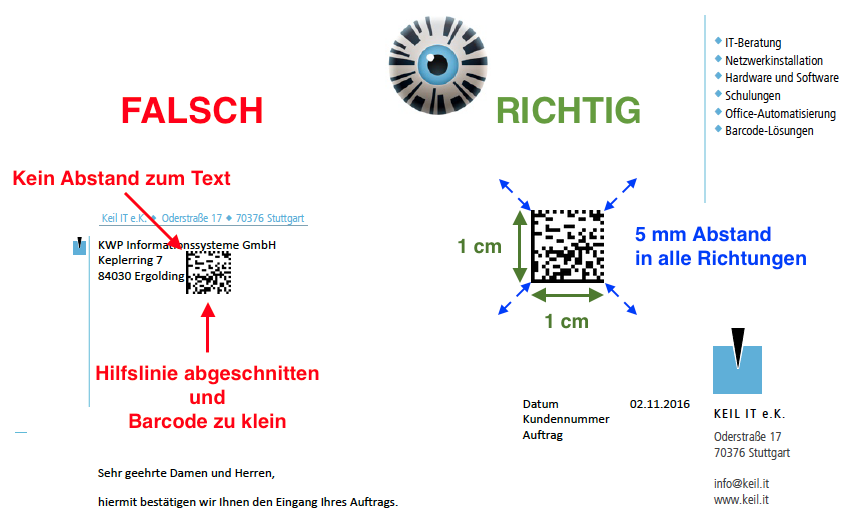
- Size: A Data Matrix barcode should be about 1 cm × 1 cm (0.4 in × 0.4 in).
- Clearance: Keep a clearance of 5 mm (0.2 in) in all directions to other text or lines so that the barcode is recognized without problems.
The following example shows a wrong and an optimal placement of a 2D barcode on the page. The same applies to 1D barcodes: the clearance to the text must be kept.
The barcode types BarcodeOCR recognizes are listed under Supported barcodes.