Work with separator sheets
If your documents have no barcode of their own, put preprinted separator sheets with a barcode between the documents before scanning. BarcodeOCR starts a new document at every separator sheet and does not include the separator sheet in the target document.
Set up the configuration
-
Open the configuration and go to the Separate step in the wizard.
-
As the split behavior, select Always begin a new document when a page with barcodes appears in the stack. The following settings are only available with this option.
-
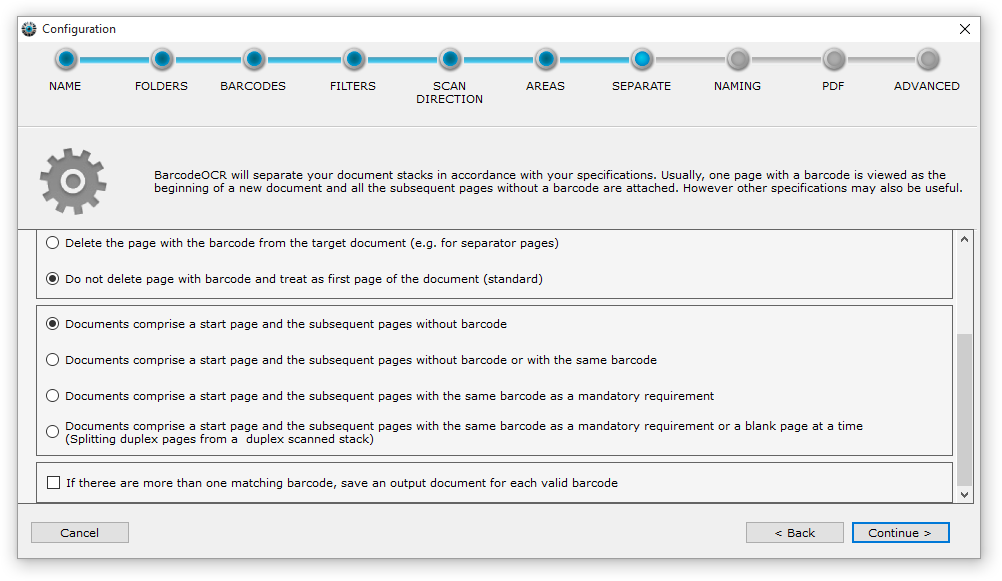
Select Delete the page with the barcode from the target document. The page with the barcode is then treated as a separator sheet and is not included in the target document.
-
Select the stack type. With Documents comprise a start page with barcode and the subsequent pages without barcode, every separator sheet marks the beginning of a new document, and all subsequent pages without a barcode are attached. For the other stack types, see Split options.
-
Complete the wizard.
Scan the batch
Put the separator sheets between the documents in the batch and scan the batch in one piece. Save the file to the input folder of the configuration.
For an overview of all options in this step, see Split options.